





Short answer: Shopify is usually the better choice for a small business that wants to launch quickly, avoid server maintenance and keep monthly costs predictable. WooCommerce is usually the better choice for a business that already runs on WordPress, publishes a lot of content, needs unusual product or checkout logic, or wants full ownership of its store data and code. Both platforms can rank well on Google and both can scale far beyond what most small businesses need. The right pick depends on how much control you want versus how much maintenance you are willing to own.
Key takeaways
- Shopify is a hosted, subscription-based eCommerce platform. Hosting, security, updates and checkout are managed for you.
- WooCommerce is a free, open-source plugin that turns a WordPress website into an online store. You choose and pay for hosting, and you are responsible for updates and security.
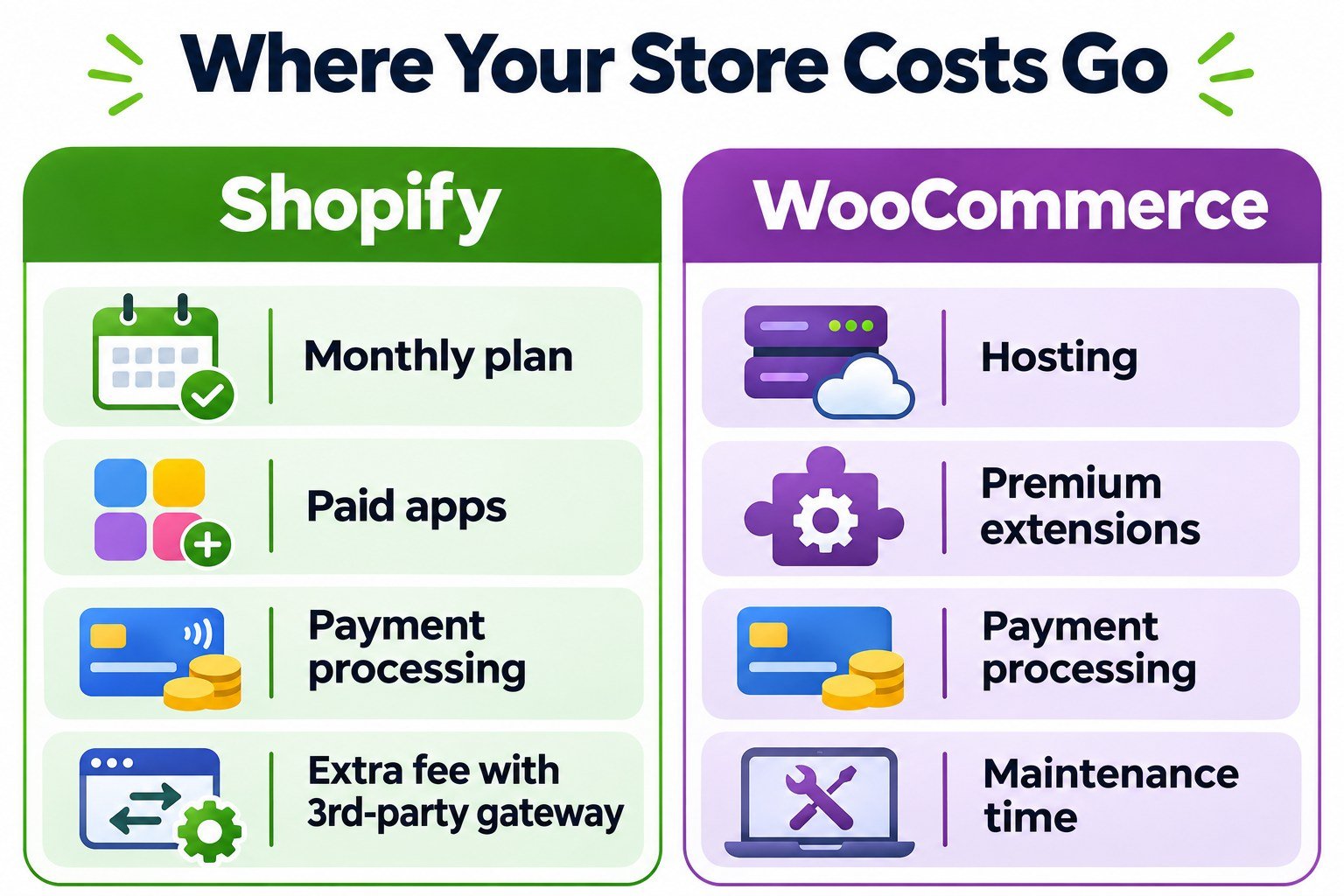
- Shopify costs are mostly fixed (plan, apps, payment processing). WooCommerce costs are mostly variable (hosting, premium extensions, developer time).
- For content-led SEO, WooCommerce benefits from WordPress’s publishing tools. For straightforward product catalogs, Shopify’s SEO foundations are more than adequate.
- Switching later is possible but costly, so choose based on where your business will be in two to three years, not just launch day.
What is the difference between Shopify and WooCommerce?
The core difference is hosted versus self-hosted. Shopify is a software-as-a-service (SaaS) platform: you pay a monthly subscription and Shopify runs the servers, applies security patches, keeps the checkout PCI compliant and ships new features automatically. You customize your store through themes and apps, but you never touch the underlying server.
WooCommerce is an open-source plugin built for WordPress, the content management system that powers a large share of the web. The plugin itself is free. You install it on your own WordPress site, which lives on hosting you choose. That gives you full access to the code, the database and the server, and it also makes you responsible for performance, backups, updates and security.
Put simply, Shopify is like leasing a fully serviced retail unit in a well-managed mall. WooCommerce is like owning your building: more freedom to renovate, and more responsibility when something breaks.
Shopify vs WooCommerce at a glance
| Factor | Shopify | WooCommerce |
|---|---|---|
| Platform type | Hosted SaaS | Self-hosted WordPress plugin |
| Software cost | Monthly or annual subscription | Free core plugin |
| Hosting | Included | You buy and manage it |
| Setup speed | Fast, guided setup | Slower; more configuration |
| Maintenance | Handled by Shopify | Your responsibility (or your developer’s) |
| Customization | Themes and apps, within platform limits | Near-unlimited with code access |
| Transaction fees | Extra platform fee if you use a third-party gateway instead of Shopify Payments | No platform fee; only your payment processor’s fees |
| Content and blogging | Basic built-in blog | Full WordPress publishing |
| Data ownership | Exportable, but platform-controlled | Full database ownership |
| Best for | Owners who want to sell, not manage tech | Content-led brands and custom requirements |
Shopify vs WooCommerce pricing: what a small business actually pays
Comparing sticker prices is misleading, because the two platforms put their costs in different places. A fair comparison looks at total cost of ownership over a year, including your time.
Shopify cost structure
- Plan subscription: a recurring fee that rises with the plan tier. Shopify publishes current plan prices on its pricing page, and they change periodically, so always check before you budget.
- Theme: free themes are available; premium themes are a one-time purchase.
- Apps: reviews, upsells, subscriptions, advanced filters and similar features often come from paid apps billed monthly. App costs are where Shopify budgets most often creep.
- Payment processing: card processing fees apply on every order.
WooCommerce cost structure
- Hosting: the single biggest variable. Cheap shared hosting is a false economy for a store; managed WordPress hosting costs more but saves time and protects speed.
- Domain and SSL: often bundled with hosting.
- Premium extensions: many WooCommerce extensions are sold as annual licenses, which you renew to keep updates and support.
- Developer time: updates, compatibility testing and troubleshooting. If you do not do this yourself, budget for someone who does.
- Payment processing: processor fees apply, as with any store.
The practical pattern: Shopify tends to cost more in predictable monthly fees and less in surprise technical work. WooCommerce can cost less in software fees but more in hosting quality and maintenance. For a small team without in-house technical help, the predictability of Shopify is often worth paying for.
Shopify vs WooCommerce transaction fees explained
This is one of the most misunderstood points in the comparison. Every online store pays payment processing fees to whoever handles the card transaction. That is unavoidable on both platforms.
Shopify adds a second layer in one situation: if you use a third-party payment gateway instead of Shopify Payments, Shopify charges an additional platform transaction fee on each sale, with the rate depending on your plan. If you use Shopify Payments where it is available, that extra platform fee does not apply.
WooCommerce charges no platform transaction fee at all. You connect a payment gateway such as Stripe, PayPal or Square and pay only that provider’s processing rates. For higher-volume stores with an established gateway relationship, this difference can matter. For most small businesses using Shopify Payments, it is a minor factor.
Shopify vs WooCommerce for SEO
Neither platform will make or break your rankings on its own. Search performance comes from site speed, clean structure, useful content, strong product pages and earned links. That said, the two platforms make different things easy.
Where Shopify is strong
- Fast, globally distributed hosting and a secure checkout out of the box.
- Automatic XML sitemaps, canonical tags and editable title tags and meta descriptions.
- Clean, mobile-friendly themes with little technical setup.
Where Shopify is limited
- Fixed URL prefixes such as
/products/and/collections/that you cannot remove. - A basic blog compared with WordPress, which matters if content marketing drives your growth.
- Some advanced technical SEO changes require theme code edits or apps.
Where WooCommerce is strong
- Full control of URL structure, schema markup and site architecture.
- The WordPress editor and SEO plugins such as Yoast SEO, which make publishing guides, comparisons and buying advice straightforward.
- The ability to build content hubs that support category and product pages through internal links.
Where WooCommerce is limited
- Speed depends on your hosting, theme and plugin choices. A poorly built WooCommerce store can be slow, and slow stores struggle to rank and convert.
- More moving parts means more chances for technical SEO issues after updates.
Our view after years of eCommerce SEO work: if your growth plan depends heavily on articles, guides and topical authority, WooCommerce gives you more room. If your plan is a focused product catalog supported by strong product pages, paid traffic and marketplaces, Shopify’s SEO foundations are fully capable.
Ease of use and day-to-day management
Shopify is built for store owners who are not developers. Adding products, managing orders, setting shipping rules and processing refunds all happen in a single, consistent dashboard, and the mobile app makes it easy to manage orders on the go.
WooCommerce feels familiar if you already use WordPress, but it asks more of you. You will manage WordPress core updates, theme updates and plugin updates, and occasionally resolve conflicts between them. Many owners solve this with a maintenance plan from their developer, which works well but should be part of the budget from day one.
Customization, features and scalability
Shopify covers the standard eCommerce needs of most small businesses very well: variants, discounts, gift cards, multiple sales channels and integrations with marketplaces and social platforms. Where you need something unusual, such as a complex product configurator, a custom quoting flow or B2B pricing rules, you are dependent on what the app ecosystem and Shopify’s APIs allow.
WooCommerce has no such ceiling. Because you control the code, almost any business rule can be built, from custom checkout fields to membership pricing to booking systems. The trade-off is that custom work needs a capable developer and ongoing care.
On scalability, both platforms run stores far larger than a typical small business. Shopify scales without you thinking about servers. WooCommerce scales well too, but traffic growth means upgrading hosting and tuning performance.
Security and maintenance responsibilities
With Shopify, platform security, PCI compliance for the checkout and uptime are Shopify’s job. Your responsibilities are strong passwords, two-factor authentication, staff permissions and vetting the apps you install.
With WooCommerce, security is shared between you, your host and your developer. Good practice includes managed hosting, regular backups, prompt updates, a security plugin or firewall, limited admin accounts and a staging site for testing changes before they go live.

Which platform should your small business choose?
Choose Shopify if you:
- Want to launch quickly and focus on products, marketing and customers rather than technology.
- Do not have in-house technical help and prefer predictable monthly costs.
- Sell a standard catalog with common features such as variants, discounts and shipping rules.
- Plan to sell across multiple channels, including social media and marketplaces.
Choose WooCommerce if you:
- Already have a WordPress website with traffic and content you do not want to lose.
- Rely on content marketing and SEO as a primary growth channel.
- Need custom product logic, checkout flows or integrations that apps cannot handle.
- Want full ownership of your store’s code and data, and have a developer you trust.
Where Magento fits in
Some owners researching Magento vs Shopify vs WooCommerce are surprised to learn that Magento (now Adobe Commerce, with an open-source edition) is generally built for larger catalogs and bigger technical teams. For most small businesses, it adds complexity and cost without a matching benefit. Shopify and WooCommerce remain the practical shortlist.
A simple decision checklist
- Existing website: Is your current site on WordPress with meaningful traffic? If yes, lean WooCommerce.
- Technical support: Do you have a developer or maintenance plan? If no, lean Shopify.
- Growth channel: Is content and organic search your main channel? If yes, lean WooCommerce.
- Product complexity: Are your products and checkout standard? If yes, Shopify is simpler.
- Budget style: Do you prefer fixed monthly costs over variable technical costs? If yes, lean Shopify.
- Control: Is owning the code and database important to you? If yes, lean WooCommerce.
If your answers split evenly, choose the platform your team will actually maintain well. A well-run store on either platform beats a neglected store on the “better” one.
Can you switch from WooCommerce to Shopify, or the other way?
Yes. Products, customers and orders can be migrated in either direction using import tools or migration services. The harder parts are preserving SEO value, which requires mapping and redirecting every old URL to its new equivalent, rebuilding the design and replacing features that relied on specific plugins or apps. A careful migration protects rankings; a rushed one can lose months of organic traffic. Plan it like a project, not a weekend task.
How iTech Graphics helps small businesses with both platforms
We build and improve stores on both platforms, so our recommendation follows your business needs rather than a platform preference. Our WooCommerce and Shopify development services cover new store builds, redesigns, migrations and ongoing improvements. We pair that with eCommerce SEO, conversion-focused web design, product and brand visuals through our graphic design services, and practical AI business automation for order, inventory and customer-service workflows. If you also sell handmade or vintage items, our Etsy shop management can run alongside your main store.
Not sure which platform fits? Send us a message with a short description of your products and goals, and we will reply with a clear recommendation.
Frequently asked questions
Is Shopify or WooCommerce cheaper for a small business?
WooCommerce has no software fee, but hosting, premium extensions and maintenance add up. Shopify has a fixed subscription plus app and processing fees. For owners without technical help, Shopify’s total cost is often similar or lower once maintenance time is counted.
Is Shopify or WooCommerce better for SEO?
Both can rank well. WooCommerce offers more control over URLs, schema and content, which suits content-led SEO. Shopify provides solid SEO foundations with less setup, which suits catalog-focused stores.
Does WooCommerce charge transaction fees?
No. WooCommerce charges no platform transaction fee. You pay only the processing fees of the payment gateway you connect, such as Stripe or PayPal.
Does Shopify charge transaction fees?
Shopify charges an additional platform transaction fee only when you use a third-party payment gateway instead of Shopify Payments. Standard card processing fees apply either way.
Which is easier for beginners, Shopify or WooCommerce?
Shopify is easier for beginners because hosting, security and updates are managed for you and setup is guided. WooCommerce is easier for people already comfortable with WordPress.
Can I move my store from WooCommerce to Shopify later?
Yes. Products, customers and orders can be migrated, but you must redirect old URLs to new ones to protect your search rankings and rebuild any custom features.
References
- Shopify Pricing: current Shopify plan prices and features.
- Shopify Help Center: Fees and costs: payment processing and third-party transaction fees.
- Shopify Help Center: Shopify Payments: how Shopify Payments works and when transaction fees apply.
- Shopify Help Center: Billing cycles and thresholds: how third-party transaction fees are calculated and billed.
- WooCommerce on WordPress.org: the free, open-source WooCommerce plugin.
- WooCommerce: Which payment option is right for me?: payment gateway options and their fees.
- WooCommerce Payments documentation: setting up and managing payment methods.