







Short answer: On November 22, 2026, an attacker used a WordPress.org developer account belonging to the plugin maker WP connect to slip a WordPress plugin backdoor into updates for six of its plugins, including Air WP Sync and WP Sync for Notion. The hidden code would have given the attacker full control of any website that installed it. It never reached live sites. WordPress.org’s new release cooldown and its automated security reviewer held the updates back, and all six plugins were closed the same evening. If you use any WP connect plugin, check your version today, remove the plugin if it matches the affected list, and scan your site.
Key takeaways
- Six plugins, one developer, two hours. All six WP connect plugins on WordPress.org received the same malicious file within a short window on the afternoon of November 22, 2026.
- Critical risk. The flaw is tracked as CVE-2026-135202 with a CVSS score of 9.8 out of 10. There is no patched version.
- Blocked before release. WordPress.org’s Protect The Shire safeguards stopped the update from going out, so most sites should be safe.
- Still worth checking. Confirm you are not running an affected version, and remove any closed plugin you no longer need.
- The bigger lesson: WordPress plugin security now depends as much on account security and release review as on clean code.
What happened to the WP connect plugins?
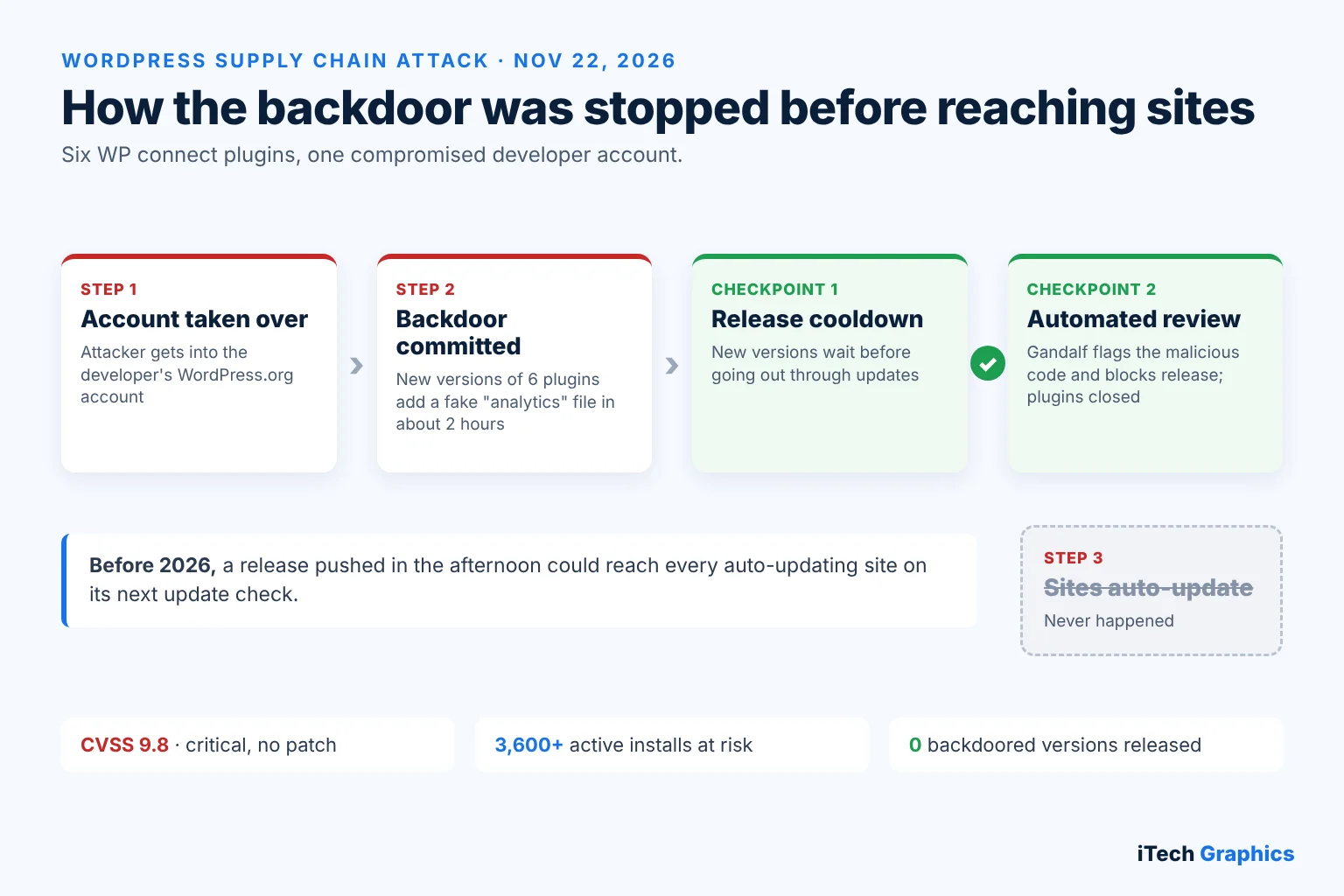
WP connect is a plugin developer whose tools connect WordPress to outside apps such as Airtable, Notion, Brevo and Gravity Forms. On the afternoon of November 22, 2026, someone pushed new versions of all six of its free plugins to the official WordPress.org plugin directory. Air WP Sync received four new versions in about 30 minutes, and the other five plugins followed minutes later. Every update was committed from the developer’s own account.
Each new version contained the same addition: one extra PHP file, includes/airwp-online.php, plus a single line in the main plugin file that loaded it on every page request. The file described itself as an “analytics and auto-update” module for the vendor. In reality it reported to a domain with no link to WP connect.
Security firm Wordfence published a detailed advisory on the incident. Its automated monitoring system, called PRISM, flagged the new code within minutes. The WordPress.org Plugins Team had already caught it with its own tools. According to Wordfence, the developer told WordPress.org that their account had been compromised, which fits the evidence: every plugin from this developer was hit at once, from one account, with code that pretended to be vendor telemetry.
Affected plugins and versions
Wordfence lists these versions as backdoored. The version released just before each one is clean.
| Plugin | Slug | Backdoored version(s) |
|---|---|---|
| Air WP Sync – Airtable to WordPress | air-wp-sync | 2.9.1 to 2.9.4 |
| WP Sync for Notion – Notion to WordPress | wp-sync-for-notion | 1.7.4 |
| Add-on Brevo for Gravity Forms | addon-gravityforms-sendinblue-free | 2.6.3 |
| Add-On for Contact Form 7 to Airtable | add-on-cf7-for-airtable | 2.5.4 |
| Add-On for Contact Form 7 to Notion | add-on-cf7-for-notion | 1.6.4 |
| Orders Sync to Airtable for WooCommerce | orders-sync-to-airtable-for-woocommerce | 1.0.2 |
Together these plugins have an estimated 3,600 or more active installations. At the time of writing, all six remain closed on WordPress.org, which means you cannot download them or receive updates for them from the directory.
What is a WordPress supply chain attack?
A WordPress supply chain attack is when an attacker poisons software at its source, such as a plugin’s official repository, instead of hacking websites one by one. Site owners then install the malicious code themselves through a normal update, because they trust the source. One compromised developer account can reach every site that runs the plugin.
That is what makes a WordPress plugin backdoor delivered this way so dangerous. The usual security advice, “keep your plugins updated,” becomes the delivery method. A firewall also has little to block, because the bad code arrives through the same channel as every legitimate update.
How the WordPress plugin backdoor worked
We will not repeat the attacker’s code here, but the behavior described in the Wordfence analysis is worth understanding in plain terms, because it shows what a modern WordPress plugin backdoor looks like.
- It ran on every visit. The module hooked into WordPress so it executed on every page load, including visits from anonymous members of the public, with a scheduled task every 30 minutes as a backup. No login was needed, and nothing appeared in the dashboard.
- It checked in with the attacker. Each time, it sent the attacker’s server a profile of the site: the web address, PHP and WordPress versions, operating system and the server user account.
- It ran whatever code came back. The server’s reply could include PHP code, which the module executed with the full permissions of WordPress. In practice, that is complete control of the site.
- It carried a toolkit for later steps. Queued commands could run system commands, read, write or delete files, export database tables, copy every user’s email address and password hash, and drop a hidden “webshell” file in the uploads folder.
- It was built to survive. A persistence command could add a separate hourly task, and webshells would keep working even after the plugin was deleted.
- It weakened its own connection. The module turned off SSL certificate checks, so anyone able to intercept the traffic, not just the attacker, could have fed it instructions.
The disguise is the clever part. A module that claims to deliver “hot-fixes” outside the normal release process can look like a product feature during a quick review. WordPress.org’s plugin guidelines do not allow plugins to update themselves this way, and that rule is exactly what this backdoor was trying to hide behind.
Why the WordPress plugin backdoor never reached live websites
Until 2026, a new plugin version on WordPress.org could reach sites with auto-updates turned on within hours of the developer pressing release. That changed on June 5, 2026, when WordPress co-founder Matt Mullenweg announced an initiative called Protect The Shire. Its first visible change was a cooling-off period: new plugin and theme releases now wait before they are sent out through auto-updates, giving people and machines time to review them. The window launched at up to 24 hours. A September 2026 post from the WordPress.org Plugins Team says it is now six hours and also applies to one-click updates from the WordPress dashboard.
During that window, each release is analyzed by an automated security review. WordPress.org says it runs several AI models alongside Jetpack Scan, cross-checks the results and gives every release a risk score. Since September 9, 2026, high-risk releases are blocked automatically, without waiting for a human on the Plugins Team to be awake. The mascot for this review is a “Wapuu” called Gandalf, a nod to the Tolkien theme.
In the WP connect case, both layers worked. The cooldown held the new versions back, and the automated reviewer independently spotted the malicious code and stopped the releases indefinitely. The plugins were closed that evening. Wordfence noted that, before these safeguards, an update pushed in the late afternoon would have been offered to every auto-updating site on its next check.
This was not the first test. WordPress.org says that on July 28, 2026, a backdoor was committed to a plugin with about 20,000 active installations. The review flagged it while it was still in the cooldown window, and the plugin was closed 26 minutes after Wordfence alerted the team.
How this compares to the 2024 WordPress.org supply chain attack
WordPress has been here before. In June 2024, attackers took over five WordPress.org developer accounts by reusing passwords leaked in other data breaches. They pushed malicious updates to plugins including Social Warfare. Those updates did go live. Wordfence estimated that about 35,000 sites could have been affected, with malware that created rogue admin accounts and injected SEO spam and crypto scam scripts.
| June 2024 attack | November 2026 WP connect attack | |
|---|---|---|
| Entry point | Five developer accounts, reused passwords | One developer account, reported as compromised |
| Plugins hit | 5 unrelated plugins | 6 plugins from one vendor |
| Payload | Rogue admin users, SEO spam, crypto scripts | Full command-and-control backdoor |
| Reached sites? | Yes, up to ~35,000 sites at risk | No, blocked during the cooldown |
| What made the difference | Updates went out immediately | Release delay plus automated security review |
The comparison shows real progress. The weak point, a single developer login, is the same in both cases. What changed is that WordPress.org now has a checkpoint between “developer pressed release” and “your site installed it.”
Are you affected? A 7-step check for site owners
Because the backdoored versions were never distributed, most sites should be fine. Still, a few minutes of checking for this WordPress plugin backdoor is cheap insurance, especially if you install plugins from ZIP files or manage many client sites.
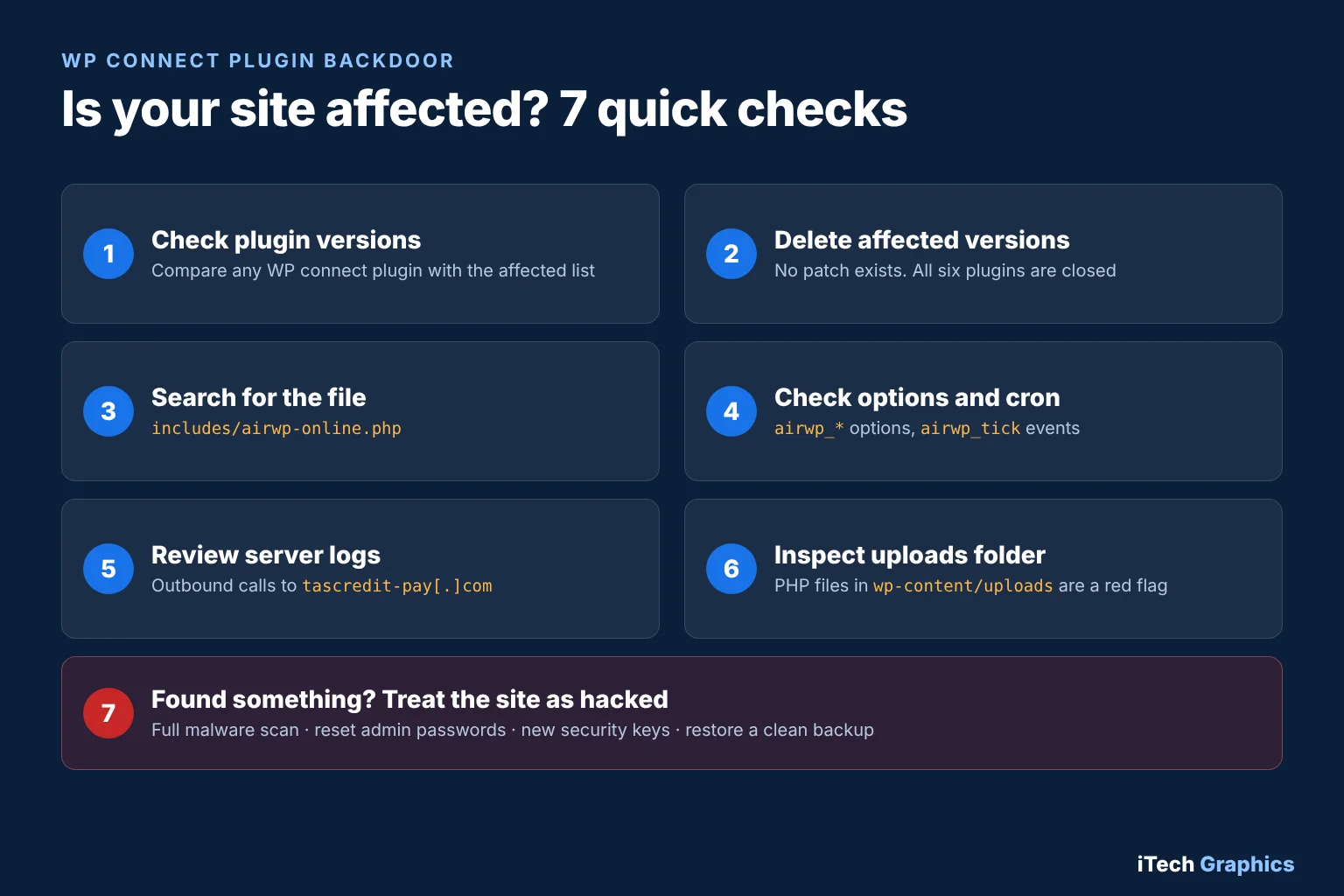
- Check your plugin list. In the WordPress dashboard, go to Plugins and look for any WP connect plugin. Compare the version number with the table above.
- Remove affected versions. If you have a listed version, deactivate and delete the plugin. There is no fixed version to update to.
- Look for the backdoor file. Search your
wp-content/pluginsfolder for a file namedairwp-online.php. - Check the database and scheduled tasks. Look for options in the
wp_optionstable that start withairwp_, and for cron events namedairwp_tickorairwp_persist_tick. - Review server logs. Search for outbound connections to
tascredit-pay[.]com, the attacker’s server named by Wordfence. - Inspect the uploads folder. PHP files inside
wp-content/uploadsare a red flag, because that folder should normally hold only media. - If anything turns up, treat the site as hacked. Run a full malware scan, reset every administrator password, change your WordPress security keys and salts, and consider restoring a clean backup from before November 22, 2026.
WordPress plugin security lessons for small businesses
Many US small business websites run a dozen or more plugins, and each one is a small supply chain of its own. A WordPress plugin backdoor like this one is a good prompt to tighten a few habits:
- Keep fewer plugins. Every plugin you delete is one less account an attacker can take over. Remove anything inactive or unused.
- Prefer active, reputable vendors. Check the “last updated” date, support forum activity and whether the vendor publishes a security policy.
- Be selective with auto-updates. The new WordPress.org cooldown helps, but for business-critical plugins like forms, checkout and membership tools, test updates on a staging site first.
- Back up daily and keep copies off the server. A clean backup is the fastest way back from any compromise.
- Run a malware scanner and watch advisories. Security plugins and vulnerability feeds will flag a known-bad plugin version faster than you can.
- Lock down your own logins. Use unique passwords and two-factor authentication for WordPress admins and your hosting account. The 2024 attack started with reused passwords.
If you build or maintain plugins, the advice from Wordfence and WordPress.org is clear: turn on two-factor authentication for your WordPress.org account, enable release confirmation emails so every new version needs a confirmed click, limit who has commit access, and get alerts when a new version of your own plugin is published.
Need help reviewing your WordPress site?
At iTech Graphics, our WordPress web design services include building lean sites with only the plugins a business truly needs. If you run WooCommerce, our WooCommerce development team can help you audit store plugins and set up safer update routines. For a second opinion on your current plugin list, contact our team.
Frequently asked questions
Which WP connect plugins were backdoored?
Six plugins: Air WP Sync (versions 2.9.1 to 2.9.4), WP Sync for Notion (1.7.4), Add-on Brevo for Gravity Forms (2.6.3), Add-On for Contact Form 7 to Airtable (2.5.4), Add-On for Contact Form 7 to Notion (1.6.4) and Orders Sync to Airtable for WooCommerce (1.0.2).
Is my WordPress site infected?
Probably not. WordPress.org’s release cooldown and automated security review stopped the backdoored versions before they were distributed. Check your plugin versions anyway, and scan your site if you installed any WP connect plugin from a ZIP file on or after November 22, 2026.
Is there a fixed version of these plugins?
No. This was deliberately planted code, not a coding bug, so there is no patch. All six plugins are closed on WordPress.org. Remove an affected version and look for an alternative or wait for the vendor to restore a clean release.
What is Protect The Shire on WordPress.org?
Protect The Shire is a WordPress.org security initiative launched on June 5, 2026. It adds a cooldown before new plugin and theme releases reach sites through updates, and runs an automated security review that can block high-risk releases.
How can I protect my site from WordPress supply chain attacks?
Use fewer plugins, choose actively maintained ones, test critical updates on staging, keep daily off-site backups, run a malware scanner and protect every admin login with a unique password and two-factor authentication.
References
- Wordfence: Supply Chain Compromise Backdoors Six WP connect Plugins, Blocked by WordPress.org’s Release Hold: original technical advisory, affected versions and indicators of compromise.
- WordPress.org News: Protect The Shire: Matt Mullenweg’s June 5, 2026 announcement of the release cooldown and Gandalf.
- Make WordPress Plugins: Automated security review for plugin releases: how the cooldown and automatic blocking work.
- Wordfence: Developer Accounts Compromised Due to Credential Reuse in WordPress.org Supply Chain Attack: the June 2024 incident.
- SecurityOnline: CVE-2026-135202 WordPress Plugin Backdoor Blocked Before Release: independent coverage of the incident.
- Kahunam: WordPress Protect The Shire, the plugin update cooldown: practical guidance on the cooldown for site owners.